BPM Rule 示例
这页只讲 workflow-demo 里已经跑通的两条规则:
wd_leave_validation:提交请假前的前置校验,挡住年假余额不足和长病假无附件。wd_leave_routing:流程内路由规则,把短假派给主管、长假派给 HR。
两条规则都在 plugins/workflow-demo/config/rules.json 声明,规则内容放在 plugins/workflow-demo/rules/*.drl,由 BPM Rule API 与 rule-task 节点调用。
规则清单
| 规则 | 类型 | 输入 | 输出 | 接入位置 |
|---|---|---|---|---|
wd_leave_validation | VALIDATION | type, days, balanceRemaining, attachmentCount | valid, reason | wd:submit_leave_request / wd:create_and_submit_leave_request 启动流程前 |
wd_leave_routing | CONDITION | days | approverRole | wd_leave_approval 的 svc_rule_route rule-task |
前置校验:wd_leave_validation
配置声明:
{
  "ruleCode": "wd_leave_validation",
  "ruleName:zh-CN": "请假申请前置校验",
  "ruleType": "VALIDATION",
  "enabled": true,
  "inputSchema": {
    "type": "object",
    "properties": {
      "type": { "type": "string", "enum": ["annual", "sick", "personal", "comp"] },
      "days": { "type": "number" },
      "balanceRemaining": { "type": "number" },
      "attachmentCount": { "type": "integer" }
    },
    "required": ["type", "days"]
  },
  "outputSchema": {
    "type": "object",
    "properties": {
      "valid": { "type": "boolean" },
      "reason": { "type": "string", "enum": ["annual_leave_insufficient", "sick_attachment_required"] }
    }
  },
  "ruleContentFile": "rules/wd_leave_validation.drl"
}DRL 只写业务判定,结果通过 _ruleResult 这条输出通道返回:
rule "reject_insufficient_annual_balance"
    when
        $req: Map(
            this["type"] == "annual",
            ((Number) this["days"]).doubleValue() > ((Number) this["balanceRemaining"]).doubleValue()
        )
    then
        Map result = (Map) $req.get("_ruleResult");
        result.put("valid", Boolean.FALSE);
        result.put("reason", "annual_leave_insufficient");
end写文档和测试时要注意三点:
inputSchema.required只要求type/days;余额和附件数量来自提交链路组装的上下文,不是用户表单必填字段。- 两条提交命令都会在流程启动前跑这条规则:
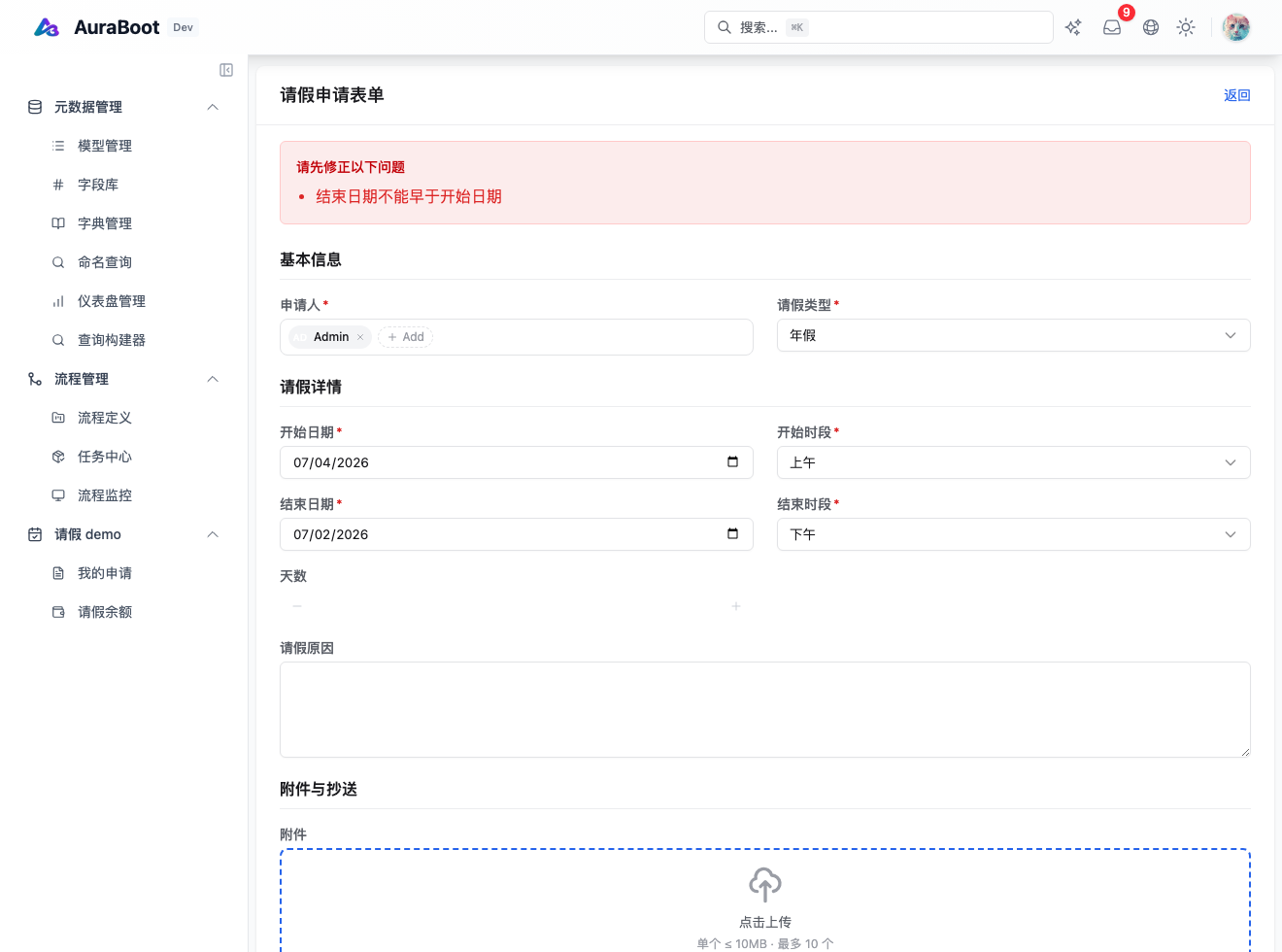
wd:create_and_submit_leave_request从payload.*取事实,wd:submit_leave_request从currentRecord.*取事实;二者都通过contextLookup查询wd_leave_balance,并把balance.wd_bal_annual_remaining暴露成balanceRemaining。 reason是错误码,不是最终中文提示。UI 层按 i18n 或命令错误处理展示给用户。- 下图展示同一请假表单的提交前错误摘要位置;
annual_leave_insufficient规则本身以wd_leave_validation.drl、两条命令的preActions、WorkflowDemoLeaveValidationRuleTest、WorkflowDemoCommandConfigTest与wd-leave-validation.spec.ts作为事实源。
流程内路由:wd_leave_routing
流程图里的 svc_rule_route 节点引用这条规则:
{
  "id": "svc_rule_route",
  "type": "rule-task",
  "data": {
    "label:zh-CN": "路由规则",
    "ruleCode": "wd_leave_routing",
    "factsVars": "days,type"
  }
}规则配置只需要 days,输出 approverRole:
{
  "ruleCode": "wd_leave_routing",
  "ruleName:zh-CN": "请假申请审批人分派",
  "ruleType": "CONDITION",
  "inputSchema": {
    "type": "object",
    "properties": { "days": { "type": "number" } },
    "required": ["days"]
  },
  "outputSchema": {
    "type": "object",
    "properties": {
      "approverRole": { "type": "string", "enum": ["manager", "hr"] }
    }
  },
  "ruleContentFile": "rules/wd_leave_routing.drl"
}DRL 分支:
rule "route_short_to_manager"
    when
        $req: Map(((Number) this["days"]).doubleValue() < 3.0)
    then
        Map result = (Map) $req.get("_ruleResult");
        result.put("approverRole", "manager");
end

rule "route_long_to_hr"
    when
        $req: Map(((Number) this["days"]).doubleValue() >= 3.0)
    then
        Map result = (Map) $req.get("_ruleResult");
        result.put("approverRole", "hr");
end后面的 gw_approver 不懂 Drools,只看流程变量:
| 变量 | 网关条件 | 分支 |
|---|---|---|
approverRole = manager | ${approverRole == 'manager'} | task_manager_approve |
approverRole = hr | ${approverRole == 'hr'} | task_hr_approve |
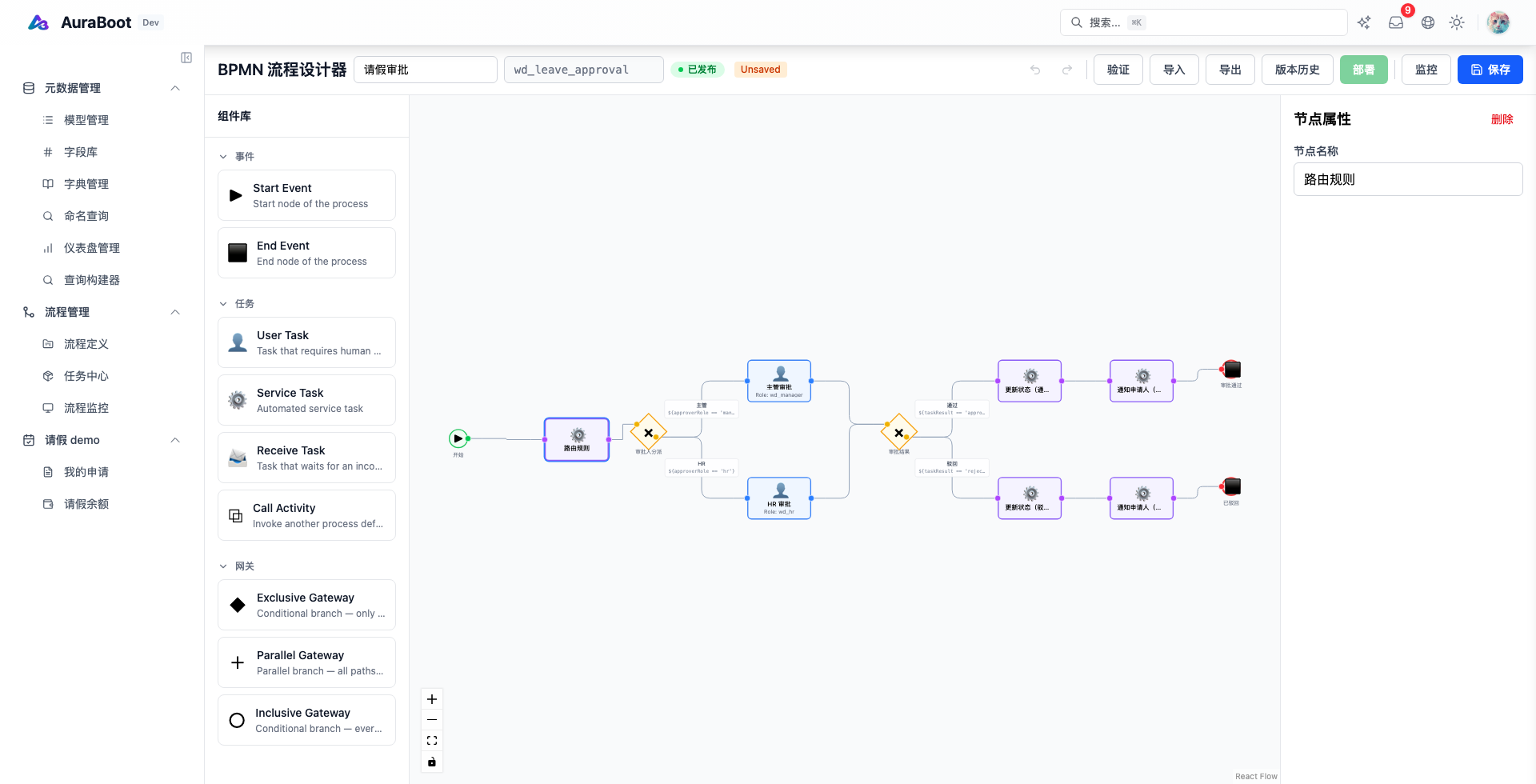
当前设计器右侧面板只展示规则任务的节点名称;ruleCode: wd_leave_routing 与 factsVars: days,type 以流程定义 JSON/BPMN 和后端导入结果为准。
API 调试入口
后端控制器是 BpmRuleController,路径前缀是 /api/bpm/rules,需要 BPM_RULE_MANAGE。
| 操作 | 端点 | 用途 |
|---|---|---|
| 列规则 | GET /api/bpm/rules?type=CONDITION | 只看某类规则 |
| 看规则 | GET /api/bpm/rules/{pid} | 查导入后的规则记录 |
| 校验 DRL | POST /api/bpm/rules/validate | 提交 { "drlContent": "..." },返回 valid/errors |
| 试算规则 | POST /api/bpm/rules/{pid}/evaluate | 用 facts 直接试跑,不启动流程 |
试算路由规则时,facts 可以只给 days:
{
  "days": 2
}期望输出里有:
{
  "approverRole": "manager"
}与 E2E 对齐
web-admin/tests/e2e/workflow-demo 已经把规则路径写成真实产品路径:
- R1 短假:提交
days=2,应出现task_manager_approve,最终审批通过后业务记录回写approved。 - R2 长假:提交
days=10,应出现task_hr_approve,且不会出现在主管待办里。 - R3 SLA:提交
days=1,确认先路由到主管任务,再观察 SLA 记录。 - R4 年假余额不足:先把余额设成
2,再提交days=64的草稿,响应包含annual_leave_insufficient,业务记录仍是draft,且wd_req_process_instance为空。 - R5 一步创建并提交:用
wd:create_and_submit_leave_request提交days=10、余额1的年假,响应同样包含annual_leave_insufficient,证明创建即提交路径没有绕过前置规则。
截图和 seed
先在网站仓运行:
cd docs/screenshot-seeds
node seed_workflow_demo.mjs --base-url=http://127.0.0.1:5173 --storage-state=tests/storage/admin.json --min-requests=12截图时至少保留三类数据:
days < 3的申请:证明wd_leave_routing输出 manager。days >= 3的申请:证明同一流程进入 HR 分支。- 年假余额不足或长病假无附件:证明
wd_leave_validation在流程启动前挡住。