BOM Standardization: a Workbench Example
The earlier pages (CRM / inventory / procurement) are the standard "list + form + detail" trio. This one takes two different angles: it shows another AuraBoot page type — the Workbench — and it explains something genuinely hard: auto-standardizing wildly-varied customer BOMs. This isn't a CRUD problem you solve by "adding a table"; it's a domain problem of parsing + matching + human-in-the-loop, which is exactly what the workbench page type — "size up a batch's health, then act on each row" — is built for.
The bom-standardization plugin (namespace bom, hybrid) declares 31 models, 65 commands, and
56 pages; its backend jar carries the stateful logic — Excel parsing, material matching, LLM
format exploration.
1. Why this is genuinely hard
A PCBA factory receives dozens of customer BOMs (Excel) a day and must turn them into standard data you can order and kit against:
- Wildly varied formats: column names (
Comment/规格/Description/Value), units, brand spellings, header positions, merged cells, multiple sheets — different for every customer, even every version. - Materials must match a standard library: the same 0402 100Ω resistor may be written a dozen ways; all must map to the one standard code in the master library.
- Matching is inherently grey: some match exactly, some only match by spec and yield multiple candidates for a human to pick, some aren't in the library at all.
- Relationships are complex: one internal item maps to many manufacturer parts (AML) and many supplier parts (AVL); and there are multi-level structured BOMs.
- It must be traceable and auditable: which code each row ended up on, whether it was auto or manually confirmed, and on what evidence — all must be recorded.
You can't build this from "one upload button + one table." AuraBoot's approach: describe the whole domain with declarative models, carry every disposition on the command pipeline, and put "overall quality + per-row disposition" on one screen with a workbench.
2. The workbench: one screen, act row by row

The workbench is the main surface for this scenario, and its information density is the point:
- Metric strip: valid 186 / confirmed 152 (green) / pending 22 (yellow) / unrecognized 12 (red) — the standardization quality of this BOM at a glance.
- Reason breakdown: not just how many are pending but why — multiple candidates / IC·connector needs review / fuzzy hit / missing key field / category unrecognized, drillable by reason.
- All / Pending-only tabs: focus on the grey area. Per row, pick a standard code / confirm /
exclude (
bom:confirm_candidate,bom:confirm_standard_item,bom:set_standard_line_exclusion). - Regenerate & download / export versions / change history: produce a clean standard BOM, with versions and an audit trail.
The workbench entry is a list of conversion tasks — one row per uploaded BOM, with the pending count so you tackle the batch that needs attention first:
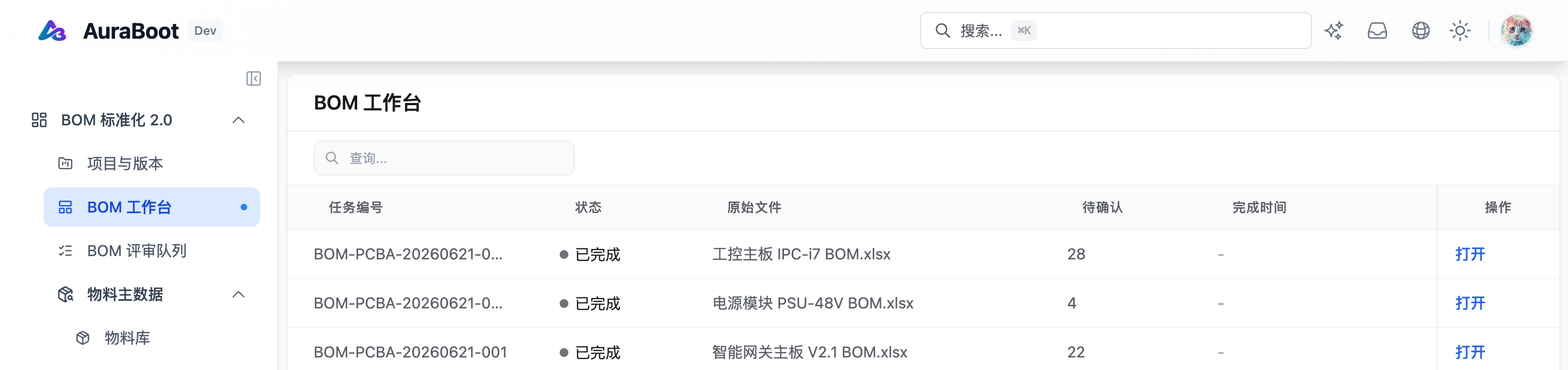
3. Matching strategy: how green / yellow / red is decided
The color of each workbench row comes from the reason code (bom_match_reason_code) the backend
matching engine assigns. This is the core intelligence of the product, in three tiers:
| Tier | Reason codes | Meaning |
|---|---|---|
| 🟢 Green (auto) | exact code hit / MPN+brand hit / spec+package hit / matched-by-spec (minor field missing) | High confidence, standard code applied automatically, no human needed |
| 🟡 Yellow (review) | multiple candidates / fuzzy hit needs review / IC·connector needs review | Confident but not unique — candidates offered for a pick; the workbench's main battleground |
| 🔴 Red (unrecognized) | no library match / missing key field / refdes-qty mismatch / category unrecognized | Data missing or not in the library — needs library or data fixes |
Candidates don't come from one place. For a pending row the system aggregates candidates from
multiple sources: flat material library / internal item master / AML / AVL / supplier part /
LLM suggestion / manual input (bom_candidate_source) — which is how "a dozen customer spellings"
converge onto one standard code.
4. Data model (31 models, grouped by responsibility)
The domain is split into five groups of declarative models, each with a clear boundary:
- Source parsing:
bom_source_artifact/bom_source_sheet/bom_source_row/bom_source_cell/bom_raw_line_pcba— the uploaded Excel decomposed into sheet→row→cell, preserving the original evidence. - Format rules:
bom_source_format_profile/bom_header_alias/bom_field_composition_rule/bom_category_rule/bom_unit_rule/bom_package_rule/bom_validation_rule— "how to read this customer's format" distilled into reusable rules. - Material master:
bom_material_master(flat library) /bom_item_master(internal item master) /bom_manufacturer_part/bom_supplier_part/bom_aml_relation/bom_avl_relation. - Conversion & review:
req_requirement_set_pcba_bom(project) /bom_conversion_task_pcba(conversion task) /req_requirement_line_pcba_bom(canonical line) /bom_standard_line_pcba(standard line) /bom_match_result_pcba/bom_match_evidence/bom_review_decision. - Structure & revisions:
bom_structure/bom_structure_line(multi-level structured BOM) /bom_export_revision/bom_revision.
The platform auto-creates tables, generates APIs, and renders pages from these — the team writes declarations, not CRUD code.
5. LLM format exploration: handling formats you've never seen
When a new customer's BOM has no matching format profile, the conversion task enters
format_exploration_required. Then bom:explore_format calls an LLM to look at the header and
first few rows and infer which column is material name / spec / refdes / quantity, producing a
candidate format profile. If confidence is high enough it auto-applies and re-runs; if not, it's
flagged for human review — the LLM is used for "reading the format," a structured judgment, not as
a substitute for deterministic material matching. Once a customer's format is confirmed it's
distilled into a bom_source_format_profile and reused next time without calling the model again.
6. How it's built on the platform
- The workbench page type uses the platform's workbench block family:
metric-strip/status-banner/tabs/workbench-action-bar. Composed in the Page Designer, not in tsx — the same family powers cockpits, reconciliation desks, approval desks, and exception queues. - Every disposition is a command on the same command pipeline: confirm a candidate, confirm a standard item, exclude a row, regenerate, export a version — authorization, validation, audit, and the state machine are built in.
- The hybrid backend carries the deterministic stateful logic: Excel parsing, the material matching engine, format exploration, export generation; models / pages / commands / dictionaries stay DSL declarations. That's the hybrid split — declarations describe "what," the jar implements "how it's computed."
In short: the workbench isn't a bespoke page, it's a platform page type; and BOM standardization is one of its strongest scenarios — a domain that genuinely needs parsing, matching, and human-in-the-loop, built from declarative models + the command pipeline + a workbench rather than a pile of hand-written code, ending up traceable, extensible, and AI-drivable.
Next steps
- Command pipeline — the execution contract every workbench action runs through
- Page Designer — where both workbenches and ordinary pages are configured
- Plugin manifest — how a hybrid plugin combines DSL with a backend jar
- Back to the use-case overview for the other industry slices